Machine Down: Why Do We Always Find Out We're Out of Spares Mid-Repair?
Laszlo Habensusz
Author
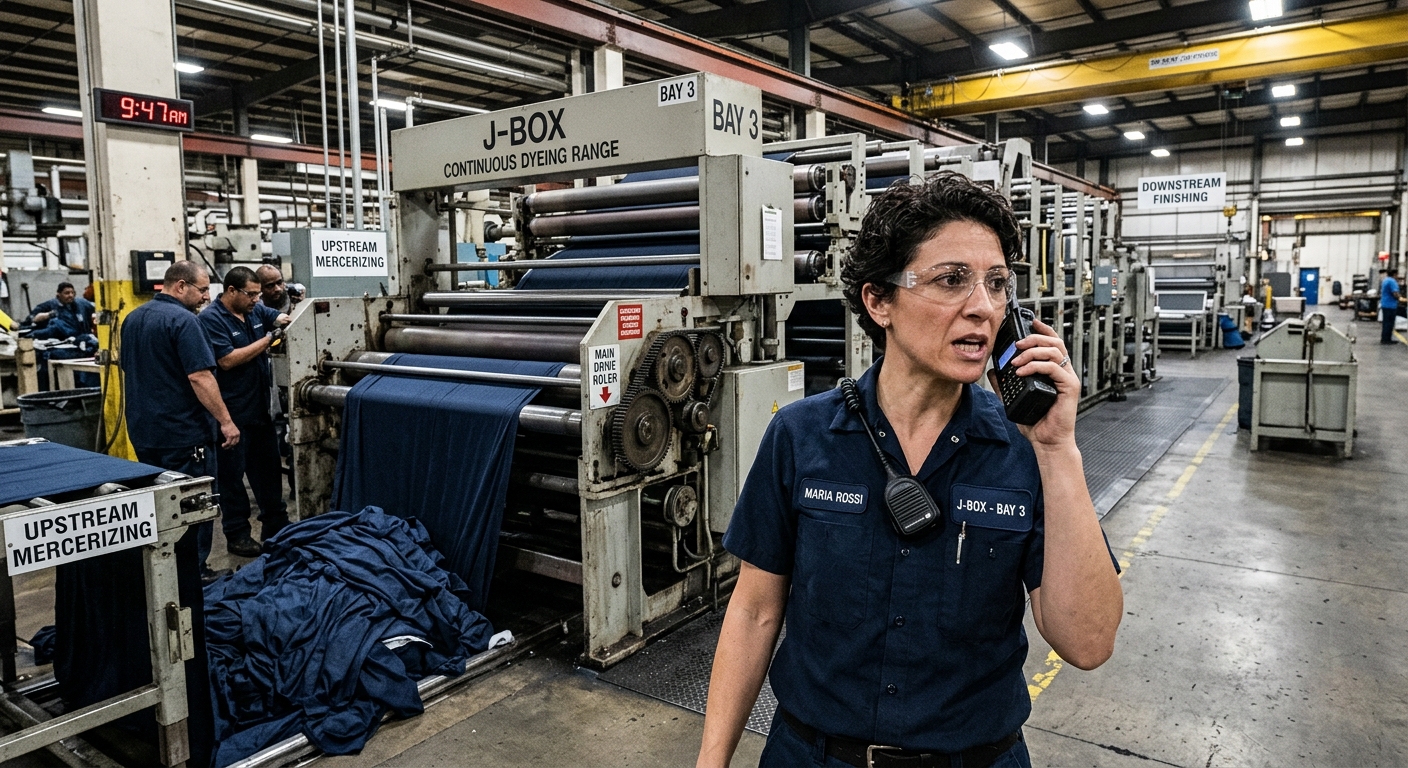
It’s 9:47 AM on Tuesday, and the main drive roller on the J-Box Continuous Dyeing Range in Bay 3 has seized. The whole line grinds to a halt. Fabric coming off the upstream mercerizing process starts piling up, and the finishing department downstream has nothing coming their way. Production Supervisor Maria Rossi is already on the radio, voice tight.
Maintenance Foreman John Davis dispatches his best tech, Mark. Mark grabs his tools, pulls the heavy access panels, and starts disassembling the drive mechanism. It's a tight space, hot and humid. An hour later, he’s got the roller out, its bearings scorched and a critical mechanical seal completely failed. He radios John: "Need a new roller assembly, bearings, and those specific Viton seals for the J-Box, Bay 3."
John heads to the parts crib. He checks the shelves. He checks the logbook. He checks the old spreadsheet. Nothing. The specific roller bearings for *that* model of J-Box? Out of stock. The Viton seals? Not a single one. That two-hour job just became a three-day wait, minimum, while they scramble to find a supplier and wait for delivery. The J-Box sits there, half-disassembled, an expensive monument to poor planning. This isn't just an inconvenience; it's a massive hit to production, an idle workforce, and potentially ruined fabric batches.
Why does this happen? Why do maintenance teams so often discover they lack a critical spare part only *after* the machine is already opened up, exposing its guts and committing the team to a repair they can't finish?
The root causes are usually straightforward. Most textile mills, especially smaller to mid-sized ones, grow organically. They buy new machines, add more looms or dyeing ranges, and their maintenance processes try to keep up. What worked for five machines quickly collapses at fifty. The "system" often relies on:
- The Veteran's Memory: Old-timers like Frank "know" what parts are usually needed for the Stenter or the Padder. But Frank retires, or is on holiday, and that knowledge walks out the door.
- The Whiteboard: A quickly scribbled note about a low stock item gets erased or ignored.
- The Spreadsheet: Someone updates it, someone forgets. It's a static snapshot, not a dynamic inventory. It doesn't tell you if a part is *allocated* to another job, just if it's "on the shelf."
- The WhatsApp Group: Urgent messages about parts get buried under other communications.
- Reactive Maintenance: Most repairs are breakdowns. There's no time to plan, so the first step is always to get eyes on the machine, diagnose, and *then* look for parts.
These workarounds are fine for simple, common consumables like grease cartridges or standard bolts. But for specialized components – like the precision bearings in a high-speed loom's shuttle, the specific nozzle tips for a digital textile printer, or the heat-resistant seals in a J-Box dyeing range – this reactive, informal approach guarantees delays. When a critical machine like the J-Box, with its dozens of unique, wear-prone parts, goes down, the cost of waiting for a part is staggering. It's not just the part cost; it's the lost production, the wasted labor, and the ripple effect across the entire plant.
How iTenance Stops Mid-Repair Part Scrambles
Imagine that same Tuesday morning, but with a system in place that anticipates and prevents the spare part scramble. Here’s how iTenance transforms that scenario:
Proactive Detection and Work Order Creation
Instead of a sudden seizure, let's say an IoT sensor monitoring the J-Box drive roller detects a subtle but consistent increase in vibration and temperature trends over the past week. This anomaly is caught as a degradation trend, not a breakdown. iTenance automatically generates a high-priority work order for the J-Box Continuous Dyeing Range in Bay 3, flagging a potential bearing or seal failure. The AI assistant parses this sensor data and suggests the most likely cause and required parts based on the asset's history.
Automated Part Availability Check
When the work order is created, iTenance immediately references the asset's full maintenance and failure history from the Asset Registry. This registry knows that specific J-Box model and its common failure points, linking directly to the required spare parts – the precision bearings and Viton seals – in the Spare Parts Inventory module. Crucially, iTenance performs a low-stock check *at this exact moment*. It doesn't just show what's "on the shelf"; it checks if enough parts are available for *this specific job* and any other scheduled work.
Informed Decision Making and Scheduling
Maintenance Foreman John Davis receives an alert about the high-priority work order for the J-Box. When he opens the digital work order, iTenance immediately displays the status of the required parts. If the bearings or seals are out of stock, the system flags the work order, preventing it from being assigned until the parts are secured. John can then quickly:
- See the exact stock level for each required part.
- Check the supplier details and lead times directly within the system.
- Determine if the work needs to be rescheduled or if an urgent order is required.
Because the issue was detected as a trend, there’s no immediate production pressure. John can order the parts and schedule the preventive repair for the end of the week, aligning it with a planned downtime window, or even a shift change, instead of reacting to a full-blown breakdown.
Efficient Repair Execution
Once the parts arrive and are logged into iTenance's inventory, the work order is updated. John assigns the job to Mark. iTenance’s People module helps here too; it confirms Mark is qualified for J-Box maintenance based on his skills registry and that he's on shift. Mark receives the work order on his mobile device. He sees that all necessary parts are confirmed in stock and their location in the crib. He collects them *before* heading to the J-Box.
When Mark reaches the J-Box, he knows he has everything he needs. He can proceed with the repair confidently, knowing the two-hour job will actually take two hours. He accesses the reusable checklists tied to the preventive maintenance schedule for this asset, ensuring every step, from lockout/tagout to reassembly and testing, is followed correctly. He uses the digital work order to record the parts used, update the status, and log any observations. This automatically updates the Spare Parts Inventory and the J-Box's Asset Registry with the latest maintenance history.
Continuous Improvement with Reporting
After the repair, John can use iTenance's Reporting dashboards. He sees the downtime for the J-Box was minimal, planned, and avoided a costly breakdown. The system tracks per-job cost and budget monitoring, showing exactly what was spent on parts and labor. The full audit log ensures transparency, showing who changed what and when. Over time, this data allows the mill to optimize reorder points for critical spares, ensuring that items like specialized J-Box bearings are always available when needed, preventing future mid-repair part scrambles.
No more sitting machines, no more frantic phone calls, no more ruined production batches. Just planned, efficient maintenance.
Your first practical step this week can be simple: pick one critical machine that causes major headaches when it goes down. Enter that machine into the Asset Registry in iTenance. List its key components and link them to the spare parts you *think* you have on the shelf. This small act of digital organization begins to build the foundation for preventing future production stoppages.
Frequently Asked Questions
What if we have multiple sites?
iTenance supports multi-site premises management, giving you a comparable view across all your textile plants. You can see spare parts inventory levels and maintenance statuses for J-Boxes or looms across different locations from a single dashboard.
How does iTenance know which parts are needed for a specific machine?
The Asset Registry within iTenance stores every machine's full history. When you set up an asset, you can link its common failure modes and preventive maintenance tasks to specific required spare parts, allowing the system to suggest them for work orders.
Can iTenance help manage our existing inventory of spare parts?
Yes, the Spare Parts Inventory module tracks stock levels, ties parts to specific machines and suppliers, and includes low-stock checks. It helps you manage what you have and ensures you don't start a job against a part that isn't available.
Does iTenance replace our current technicians' knowledge?
No, iTenance augments it. It captures the "tribal knowledge" in a structured way, making it accessible to everyone. The AI assistant can suggest technicians based on a skills registry, ensuring the right person is assigned, while checklists ensure consistent quality.
Tags
Laszlo Habensusz
Author
Related Posts
Why Can't I Tell Which Plant Is Really Struggling with Downtime?
Sep 21, 2026 · 6 min read
Why Do Our New Maintenance Technicians Take So Long to Get Up to Speed?
Sep 14, 2026 · 8 min read
A 10-Minute Walkthrough That Shows Where Your Maintenance Requests Really Go
Aug 11, 2026 · 8 min read
Ready to optimize your maintenance?
Start your 30-day free trial today. No credit card required, no hidden fees.