A 10-Minute Walkthrough That Shows Where Your Maintenance Requests Really Go
Laszlo Habensusz
Szerző
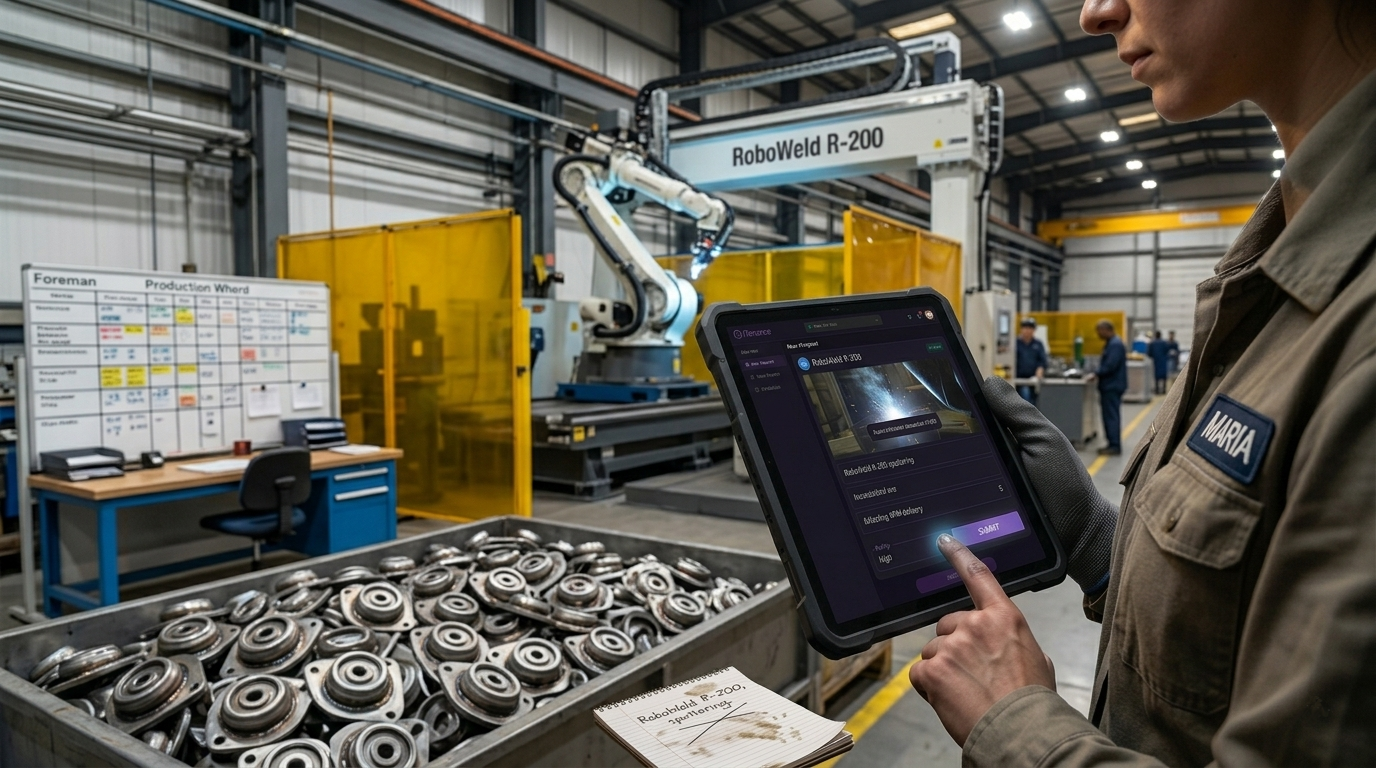
It’s 2:45 PM on the sub-assembly line at your automotive parts plant. Maria, an operator, is running the RoboWeld R-200 arc welder, making strut mounts for the 4 PM delivery. Suddenly, the arc sputters, and the weld quality on a batch of mounts looks off. She knows these parts are critical for a just-in-time customer. A bad batch means a line stop for them, and a big penalty for you.
Maria grabs her radio. "Maintenance, we've got an issue with the RoboWeld R-200!" Static crackles back. "Copy that, Maria. We're tied up with the CNC mill right now, stand by." She tries again five minutes later, still no luck. Frustrated, she scribbles a note on a grease-stained pad: "RoboWeld R-200, sputtering, bad welds." She leaves it on the maintenance foreman's desk, hoping he'll see it. The line slows, bad parts pile up, and the clock ticks towards 4 PM. This isn't just a minor glitch; it's a direct threat to your production schedule and customer relationship.
If this scene sounds familiar, you're not alone. Many plants struggle with a critical blind spot: knowing where maintenance requests actually go once an operator spots a problem. The moment a machine acts up, your team needs a clear, direct path to report it, not a guessing game. Without it, requests get lost, priorities are misunderstood, and small issues escalate into major breakdowns, costing you time, money, and customer trust.
The Real Cost of Lost Requests: Why Old Methods Fail
Maria's experience with the RoboWeld R-200 isn't an isolated incident. It highlights a fundamental breakdown in communication that plagues many manufacturing and facility teams. The problem isn't usually a lack of willingness to report issues, but a lack of a reliable, consistent system for doing so.
Consider the typical ways maintenance requests get handled in plants without a dedicated system:
- The Radio Call: Effective for immediate, urgent needs, but terrible for detail. "It's making a funny noise" doesn't give a technician much to go on. And if the maintenance team is busy, the call might be forgotten or just become background noise.
- The WhatsApp Group: Quick and informal, but chaotic. Messages get buried under memes, personal chats, and irrelevant updates. There's no central record, no way to track who saw what, and no accountability. When multiple shifts are involved, the context is often lost.
- The Scribbled Note/Whiteboard: Often vague ("Stamper 3 needs looking at"), easily misplaced, or wiped clean. It relies on someone physically seeing it and remembering to act. This works for one or two machines, but at fifty, it collapses into a mess of conflicting priorities and forgotten tasks.
- The Veteran's Memory: Many operations rely on the institutional knowledge of a few experienced technicians or foremen. They remember who said what, when, and about which machine. But when that person is off-shift, on holiday, or retires, that critical information walks out the door.
These workarounds might seem to "get the job done" for minor issues, but they crumble under pressure. When the RoboWeld R-200 starts sputtering, the root cause might be a worn contactor in the power supply or a clogged gas nozzle. Maria doesn't know that. What she knows is the weld quality is bad. If her request for help gets lost, that sputtering turns into a full breakdown, stopping the sub-assembly line entirely. That 4 PM delivery is now missed, and you're scrambling to explain to a furious customer why their production line just went idle because of a problem you didn't even know existed.
The consequences ripple out: increased unplanned downtime, higher repair costs (because small issues become big ones), missed production targets, and frustrated operators who feel their concerns aren't being heard. It’s a cycle that undermines efficiency and morale.
How Mobile Job Requests Get Every Problem Seen and Solved
Imagine Maria's afternoon again, but this time, her request for the RoboWeld R-200 doesn't get lost in the shuffle. Instead, it triggers an immediate, traceable workflow. This is where iTenance's mobile job request capability makes a tangible difference.
The RoboWeld R-200 Gets the Attention It Needs
Let's revisit Maria's 2:45 PM problem with the RoboWeld R-200 arc welder:
- Operator Reports the Fault: Maria notices the sputtering and poor weld quality. Instead of the radio or a note, she pulls out her company-issued tablet or smartphone. She opens the iTenance app.
- Quick Asset Identification: Maria taps "New Request." The app prompts her to identify the asset. She simply scans the QR code affixed to the RoboWeld R-200. Instantly, the system knows she's reporting on that specific machine.
- Detailed Problem Description: She types a clear, concise description: "RoboWeld R-200 sputtering, inconsistent arc, weld quality poor on strut mounts. Affecting 4 PM JIT delivery parts." The app's plain-language processing (AI assistant) understands her input.
- Visual Evidence: Crucially, Maria uses her phone's camera to snap a photo of the faulty weld. This visual evidence is attached directly to the request. No more "funny noise" descriptions; maintenance sees exactly what Maria sees.
- Setting Priority: Given the JIT impact, Maria sets the priority to "High."
- Instant Submission: She taps "Submit." The request is now live in the system.
What Happens Next in iTenance:
The moment Maria submits her request, a cascade of actions begins, all without anyone retyping a single piece of information:
- Work Order Creation: iTenance automatically generates a new work order for the RoboWeld R-200. This work order includes Maria's detailed description, the attached photo, and the high priority she set. It's instantly visible in the maintenance queue.
- Foreman Notification and Assignment: David, the maintenance foreman, receives an immediate notification on his tablet or desktop. He sees the new work order at the top of the queue, complete with the photo of the bad weld. He can quickly review the RoboWeld R-200's asset registry to check its maintenance history for similar issues, helping him diagnose the potential root cause faster. Recognizing it's a welding issue, he uses the "People" module to find an available technician with welding expertise, Ken, and assigns the work order directly to him.
- Technician Action: Ken receives a notification on his mobile device. He opens the iTenance app and sees the new work order for the RoboWeld R-200. He views Maria's description and the attached photo, instantly understanding the specific problem without having to go ask Maria or guess. He accepts the work order, and his status updates to "En Route."
- On-Site Resolution: At the RoboWeld R-200, Ken uses his device to access any relevant manuals or previous work order notes for the machine. He diagnoses a worn contactor. He checks the spare parts inventory directly from the app to ensure the correct replacement part is in stock. If it wasn't, the system would flag it before he even started the job. After replacing the part, he updates the work order status to "Complete," adds his notes on the repair, and logs the parts used.
- Real-Time Updates: Maria receives a notification that her request has been completed. David sees the updated status on his dashboard (Reporting), and the RoboWeld R-200's asset history is updated with the full details of the repair, including time, cost, and parts used (Work orders, Asset registry). This builds a comprehensive record for future analysis.
From the moment Maria spotted the issue at 2:45 PM until Ken completed the repair, the entire process was transparent, documented, and efficient. The problem didn't get lost; it was captured, prioritized, and resolved, keeping the sub-assembly line moving and ensuring that 4 PM JIT delivery stayed on track.
This isn't just about fixing machines faster; it's about empowering your operators, giving your maintenance team clear information, and protecting your production schedule from the hidden costs of poor communication.
Take the First Step This Week
Getting started doesn't require a massive overhaul. You can see the immediate benefit of mobile job requests in under an hour.
This week, pick one critical machine on your plant floor – perhaps one notorious for generating lost requests. Affix a simple QR code to it. Then, download the iTenance app on a mobile device. Create a new asset entry for that machine in the system. Show an operator how to open the app, scan the QR code, and submit a test request with a photo. See how quickly that request appears in your maintenance queue. This small step will demonstrate the immediate visibility and control you gain, proving that a lost maintenance request can become a problem of the past.
Gyakran ismételt kérdések
Can any operator submit a request, or do they need special training?
Any operator can submit a request with minimal training. The mobile interface is designed to be intuitive, allowing them to quickly identify the machine, describe the problem, and attach photos with just a few taps.
What if an operator doesn't know the exact machine name or model?
Operators can easily identify assets by scanning a QR code or barcode directly on the machine. If no code is present, they can also select the asset from a clear, searchable list within the app.
How do we prevent operators from submitting too many non-critical requests?
The system allows for setting priority levels, which can be reviewed and adjusted by maintenance supervisors. You can also provide clear guidelines to operators on what constitutes an urgent request versus a routine observation, and supervisors retain full control over the maintenance queue.
Can we track the status of a request after it's submitted?
Yes, once a request is submitted, it becomes a work order with a traceable status. Operators or supervisors can see if it's pending, assigned, in progress, or completed, providing full transparency on its progress.
What happens if there's no internet connection on the plant floor?
iTenance supports offline capabilities for many functions, including submitting requests. Once a connection is re-established, the data automatically syncs with the main system, ensuring no information is lost.
Címkék
Laszlo Habensusz
Szerző
Kapcsolódó bejegyzések
Why Can't I Tell Which Plant Is Really Struggling with Downtime?
Sep 21, 2026 · 6 min read
Why Do Our New Maintenance Technicians Take So Long to Get Up to Speed?
Sep 14, 2026 · 8 min read
Machine Down: Why Do We Always Find Out We're Out of Spares Mid-Repair?
Aug 16, 2026 · 7 min read
Készen áll a karbantartás optimalizálására?
Indítsa el 30 napos ingyenes próbaidőszakát még ma. Nincs szükség hitelkártyára, nincsenek rejtett díjak.